Hurry Up
A simple timer to hurry up your players in combat! Tired of those pesky players taking forever to then just swing a longsword after a 10 minute wait?
Getting Started
Combat Timer
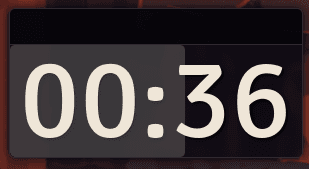
- The Combat Timer automatically starts in combat for characters that are owned by a player.
- It can be disabled altogether.
- It can be enabled for all tokens in combat.
- Check the module settings for customization options.
Independent Timers
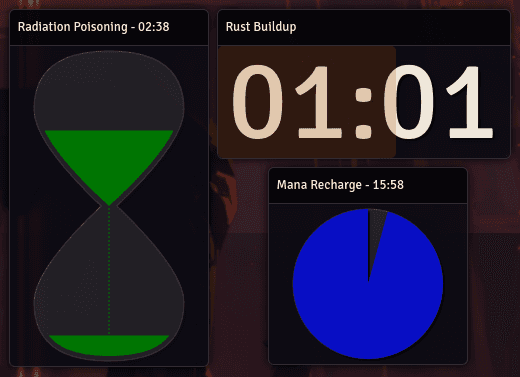
- The Independent Timers can be created inside or outside of combat.
- They can be paused and resumed.
- They can be created with custom names, durations and styles.
- Check the module settings for customization options.
Timer Controls
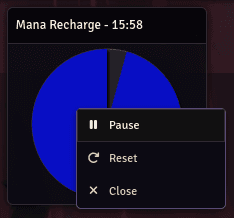
- The timer controls are available in the context menu.
- Pause/Resume: pauses/resumes the timer. This pause is independent of the game pause.
- Reset: resets the timer.
- Close: deletes the timer.
Create a Timer
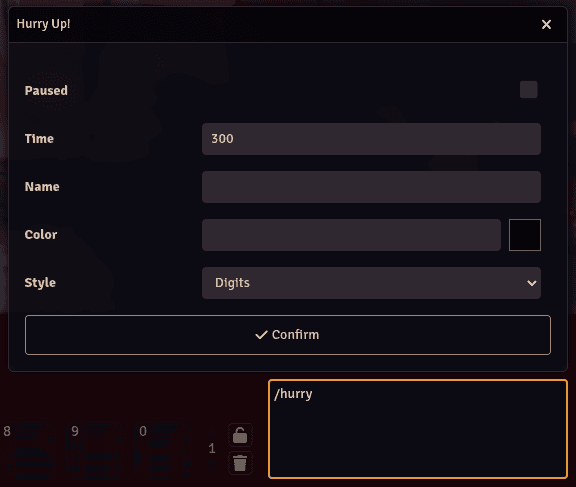
- The command
/hurry(or/timer) opens a new timer configuration window. - The shorthand
/hurry [time]creates a timer with the specified duration. [time]can be a number or a time in the formats1h30m25sor1:30:25.- Adding a
?after the command starts a paused timer. - Example:
/timer? 10mcreates a 10 minute paused timer. - Example:
/hurry 23:10creates a 23 minutes and 10 seconds running timer. - Example:
/hurry? 100creates a 100 second paused timer.
Advanced
Macros
CombatTimer.createTimer()
Creates a new timer with the specified duration and options. Returns the created timer object.
await CombatTimer.createTimer(time, options)time(Number) - Duration in secondsoptions(Object) - Optional configuration:name- (String) Timer labelcolor- (String) Hex color code (rgb)paused- (Bool) Start paused (default:false)style- (String) Timer style (choices:"digits","circle","sand")
Examples
Basic 60-second timer
await CombatTimer.createTimer(60);Named timer with custom color
await CombatTimer.createTimer(30, {
  name: "Dragon's Breath",
  color: "#ff4500"
});
Paused timer with custom style
await CombatTimer.createTimer(120, {
  name: "Ritual Casting",
  paused: true,
  color: "#9370db",
  style: "circle"
});
CombatTimer.deleteTimer()
Deletes a timer by its ID.
Named timers' id are of the format "hurry-up-{name}" (slugified).
Unnamed timers' id are of the format "hurry-up-{randomId}".
await CombatTimer.deleteTimer(id)id(String) - The timer ID to delete
Example
Delete a secondary timer
await CombatTimer.deleteTimer("hurry-up-dragons-breath");CombatTimer.setPause()
Pauses or unpauses a timer.
Named timers' id are of the format "hurry-up-{name}" (slugified).
Unnamed timers' id are of the format "hurry-up-{randomId}".
await CombatTimer.setPause(id, paused)id(String) - The timer IDpaused(Boolean) -trueto pause,falseto unpause
Example
Pause a timer
await CombatTimer.setPause("hurry-up-dragons-breath", true);Pause a timer
await CombatTimer.setPause("hurry-up-dragons-breath", false);CombatTimer.reset()
Resets a timer back to its original duration.
CombatTimer.reset(id)id(String) - The timer ID to reset
Example
Reset a timer
CombatTimer.reset("hurry-up-dragons-breath");Credits
The sounds included are from GameAudioGDC (opens in a new tab).