Particles API
Particle3D plays spell and attack effects in the 3D view from a macro: arrows, fireballs, rays, explosions, auras, flamethrowers. Every user viewing the scene in 3D sees them. This page is the full reference, with ready-made examples at the end.
No code needed for the common cases: tiles, tokens and lights have a Particle Preset option, and the Token HUD has quick effects. See Weather, Shaders & Effects.
Quick Start
- Open the scene in 3D.
- Select your token and target an enemy (
Twhile hovering it). - Create a macro (
Type:Script) with this code and run it:
new Particle3D("fireball").from(token).to(game.user.targets.first()).start();A fireball flies from your token and explodes on the target. In a script macro, token is your selected token.
How an Effect Is Built
Every effect is one chain:
new Particle3D("<type>"): which effect (list below)..from(...): where it starts. Not needed for explosions and presets..to(...): where it goes or where it plays. Leave it out (or use.toTarget()) to aim at the tokens you have targeted.- Options in any order, for example
.color("blue")or.speed(5). .start(): plays it. Nothing happens without it.
.from() and .to() take a token, any other placeable (tile, light, note...), a point { x, y, z } (x and y in pixels of the scene, z the elevation), or an array of them. With several origins or targets, every origin sends the effect to every target.
Without .to() and with no token targeted, nothing plays and the console shows "Particle system: Source or target is missing or undefined."
Effect Types
The first group follows a path from .from() to .to(); the others play at the .to() position. The old shorthands still work: "p" = projectile, "r" = ray, "e" = explosion, "s" = sprite.
- Projectiles (need
.from()):arrow,bolt,javelin,bullet,shotgun,dagger(Thrown Dagger),flask,boulder,projectile,earthprojectile,blackdart,runicshot,magicarrow,fireball,icelance,acidglob,missilevolley,meteor. - Rays (need
.from()):ray,runicray,voidray,frostray,disintegrate,tether,chainlightning. - 3D objects (need
.from()):sprite(any 3D model flies to the target, see 3D Model Particles),swing,thrust,thrustswing. - Cones (they spray from
.from()towards the target; with only.to()they play at the target):directionalfire(Flamethrower),directionalshock(Electric Burst),directionalpoison(Poison Cloud),directionalwave(Wave),directionalfrost(Frost),directionallaser(Laser). - Explosions and bursts:
explosion,earthexplosion,slash,magicburst,jb2aexplosion,jb2aexplosionnolight,castingsign(Ritual),lightning,starburst,skypillar,icenova,thunderwave,healburst,smite,teleport,summon,shatter,contactspark,hitpuff,iceshatter,splash,flaskshatter,rockimpact,meteorimpact. - Presets (the effects of lights, tiles and tokens; they last only 0.3 seconds unless you give a
.duration()):custom,torch,fire,magiccircle,sparks,holy,ghostly,smokecloud,mysteriouslights,sunburst,tesla,mist,mist2,gravitywell,vortex,fairy,magicsphere,candle,lantern,brazier,campfire,forge,steam,waterfallmist,fireflies,portal,auraflame,aurafrost,auraholy,aurashadow,aurashield,fogvolume,darknessvolume,smokevolume.
A wrong type shows an error notification with the list of valid types. The ready-made effects have their own look: options like .color() and .scale() adjust them, while the basic projectile, ray, explosion and custom types follow every option.
Method Reference
Each method returns the effect, so they can be chained. Times are in milliseconds, sizes in grid squares.
Origin and Target
.from(origin): where the effect starts (see above)..to(target): where it goes, or where it plays..toTarget(): the tokens you have targeted. Same as leaving out.to()..attach(): the effect follows the target token when it moves. For presets and explosions on a token..onCenter(): a preset plays at the middle of the token instead of at its feet..meshSurface(): a preset is emitted from the whole surface of the target's 3D model (token or tile), for a burning or glowing creature..miss(): the effect misses: it flies past the target and stops on whatever it hits behind it..miss(false)turns it off again, handy when a variable decides it.
Starting and Stopping
.start(): plays the effect for everyone and returns its id..start(false)plays it only on your screen. Don't change the effect after.start()..name("Wall of Fire"): gives a name, to stop it later from another macro.Particle3D.stop(idOrName): stops the effect with that id, or every effect with that name, for everyone.Particle3D.stop("all"): stops every effect, including the particles of lights, tiles and tokens of the scene. They come back when the scene is reloaded (game.Levels3DPreview.reload())..onEnd(effect): plays anotherParticle3D(or an array of them) when this one ends, for example an explosion where a projectile lands. Don't call.start()on the inner effect. Leave out its.to()to play it where the first one hit, and its.from()to start it from the same origin. The inner one can have its own.onEnd(). It does not run if the effect is stopped withParticle3D.stop().
An effect starts a moment after .start(). Particle3D.stop() in the same macro, right after .start(), comes too early and the effect keeps going: wait first (see the examples) or stop it from another macro.
Timing
.duration(ms): how long rays, cones and presets last (default 300).Infinitykeeps them on until stopped..repeat(n): plays the effectntimes..delay(ms): the pause between repeats, and between origins when there are several..startAfter(ms): waits before starting.
Path and Motion
.speed(n): how fast projectiles travel (default 10)..arc(n): the path curvesntimes on the way, each projectile in a different direction (default 0, straight)..gravity(n): pulls particles down; 1 is like Earth, negative values make them rise..mass(n): how strongly gravity pulls each particle (default 100)..force(n): how hard an explosion throws its particles out (default 15)..push(x, y, z): a steady push on every particle, like wind;zis up..coneAngle(radians): how wide a cone effect opens (default about 0.35, 20°).
Look
.sprite(path): the image used for each particle. 3D Canvas has many inmodules/levels-3d-preview/assets/particles/(flame_01.png,spark_04.png,star_09.png,slash_03.png,dust.png...). For thespritetype, a 3D model instead..color(start, end): colour at the start and at the end of each particle's life. Any CSS colour ("red","#2e4aff"). Give an array (["red", "blue"]) and each particle picks one at random (it is not a gradient). With onlystart, the colour stays the same..alpha(start, end): opacity from 0 to 1 at the start and end of each particle's life..scale(start, end): size of each particle at the start and the end of its life (default 0.8 to 0)..autoSize(): sizes the effect to the token it plays on (a Large creature gets a bigger aura)..presetIntensity(n): makes a preset stronger (2 = twice as dense) or weaker (0.5)..rate(particles, ms): how many particles and how often they are made (default 15 every 10 ms). Rays and big effects look fuller with more, for example.rate(100, 1)..life(min, max): how long each particle lives; longer means longer trails (default 100 to 500). One value sets both..emitterSize(n): the radius of the area particles start from (default almost 0: one point)..impact(false): no hit effect when a projectile or ray lands..impact("iceshatter")plays that explosion type instead of the usual one. An.onEnd()effect replaces the impact.
3D Model Particles
With the sprite type, .sprite() takes a 3D model (.glb) that flies to the target and stays stuck in it (until the scene is reloaded). 3D Canvas includes arrow_particle.glb, bolt_particle.glb, javelin_particle.glb and bullet.glb in modules/levels-3d-preview/assets/particles/models/; the Mapmaking Pack has weapons and items.
.up(x, y, z): which way the tip of the model points in the file, for example.up(0, 0, 1)(default0, 1, 0)..rotation(x, y, z): extra rotation of the model, in degrees..rotateTowards(): the model swings down onto the target instead of flying, like a sword blow.
Token Animations
.playAnimation(data) plays a token animation with the effect. from animates the origin token, to the target. By default the origin animates when the effect starts and the target when it lands; set start and end to change that:
new Particle3D("arrow")
  .from(token)
  .to(game.user.targets.first())
  .playAnimation({
    from: { id: "bow" },
    to: { id: "shake", options: { start: false, end: true } },
  })
  .start();
Animation ids: twirl, slash, swipe, charge, bow, buff, debuff, breath, shake, knockback. A missed effect (.miss()) does not animate the target.
Examples
Select a token, target one or more tokens, then run the macro. Change the numbers to see what each option does.
Frostbolt
new Particle3D("projectile")
  .from(token)
  .to(Array.from(game.user.targets))
  .sprite("modules/levels-3d-preview/assets/particles/star_09.png")
  .speed(10)
  .color("#0f4fff", "#4dd5ff")
  .scale(0.7)
  .start();
Bouncing Frostbolt
The bolt flies to the targets and back, with .onEnd().
new Particle3D("projectile")
  .from(token)
  .to(Array.from(game.user.targets))
  .speed(10)
  .color("#0f4fff", "#4dd5ff")
  .scale(0.8)
  .onEnd(
    new Particle3D("projectile")
      .from(Array.from(game.user.targets))
      .to(token)
      .speed(10)
      .color("#0f4fff", "#4dd5ff")
      .scale(0.8)
  )
  .start();
Magic Missile
Three darts, each curving its own way with .arc().
new Particle3D("projectile")
  .from(token)
  .to(Array.from(game.user.targets))
  .speed(8)
  .repeat(3)
  .arc(1)
  .delay(300)
  .color("#ffffff", "#2e4aff")
  .scale(0.7)
  .start();
Spirit Bolt
A curving bolt with a purple explosion where it lands. The explosion has no .to(), so it plays on the target hit.
new Particle3D("projectile")
  .from(token)
  .to(Array.from(game.user.targets))
  .speed(15)
  .arc(1)
  .color("#c034eb", "#5819b5")
  .scale(1)
  .onEnd(
    new Particle3D("explosion")
      .sprite("modules/levels-3d-preview/assets/particles/dust.png")
      .speed(0)
      .color("#c034eb", "#291547")
      .scale(0.9, 0.9)
      .gravity(-5)
      .life(1700)
      .force(3)
      .rate(50, 1)
      .emitterSize(0.05)
      .alpha(0.1, 0)
      .mass(200)
  )
  .start();
Shocking Grasp
new Particle3D("ray")
  .from(token)
  .to(Array.from(game.user.targets))
  .sprite("modules/levels-3d-preview/assets/particles/spark_04.png")
  .color("blue", "#2e4aff")
  .scale(0.7)
  .rate(100, 1)
  .start();
Scorching Ray
Three short rays in a row.
new Particle3D("ray")
  .from(token)
  .to(Array.from(game.user.targets))
  .sprite("modules/levels-3d-preview/assets/particles/flame_01.png")
  .color("red", "orange")
  .scale(0.5)
  .repeat(3)
  .duration(250)
  .delay(600)
  .rate(100, 1)
  .start();
Party Bolts
Each particle picks a random colour from the arrays.
new Particle3D("projectile")
  .from(token)
  .to(Array.from(game.user.targets))
  .sprite("modules/levels-3d-preview/assets/particles/slash_03.png")
  .repeat(3)
  .delay(200)
  .speed(10)
  .color(["red", "blue"], ["green", "yellow"])
  .start();
Fire Explosion
Explosions need only .to().
new Particle3D("explosion")
  .to(Array.from(game.user.targets))
  .sprite("modules/levels-3d-preview/assets/particles/dust.png")
  .speed(0)
  .color("red", "orange")
  .scale(2, 2)
  .gravity(2)
  .life(700)
  .rate(10, 1)
  .emitterSize(1)
  .alpha(0.1, 0)
  .mass(400)
  .start();
Ray of Fire for One Second
The ray lasts until stopped (Infinity); the macro keeps its id and stops it after 1000 ms. The same idea can end an effect when concentration ends.
const effectId = new Particle3D("ray")
  .from(token)
  .to(Array.from(game.user.targets))
  .sprite("modules/levels-3d-preview/assets/particles/flame_01.png")
  .color("red", "orange")
  .scale(1.5)
  .duration(Infinity)
  .rate(100, 1)
  .gravity(-5)
  .start();

setTimeout(() => {
  Particle3D.stop(effectId);
}, 1000);
Ray of Fire, Stopped by Name
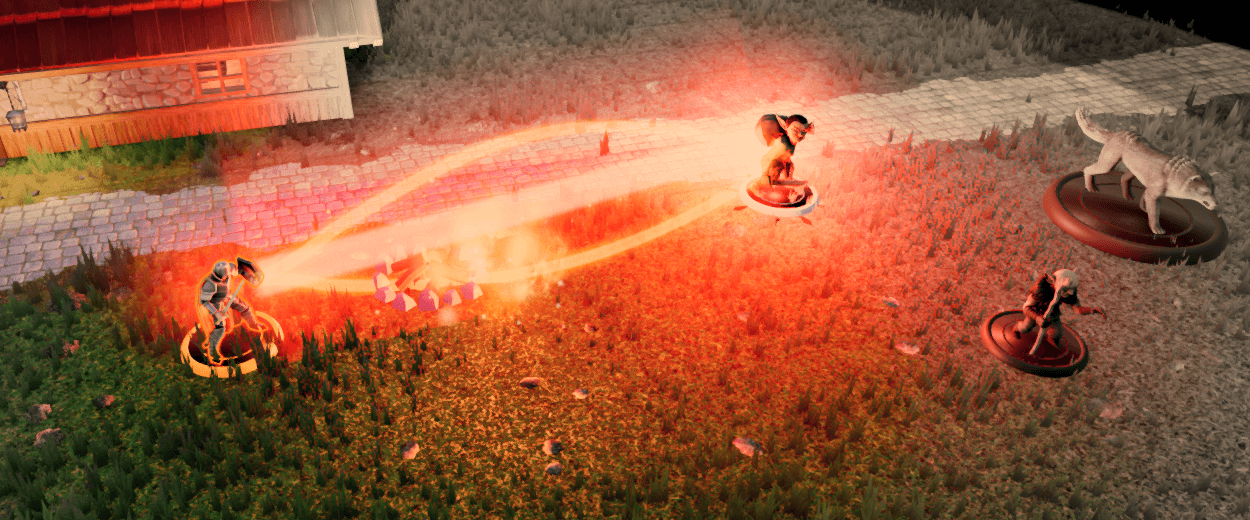
This one has a name and runs until another macro stops it (this is the image at the top of the page):
new Particle3D("ray")
  .from(token)
  .to(Array.from(game.user.targets))
  .sprite("modules/levels-3d-preview/assets/particles/flame_01.png")
  .color("red", "orange")
  .name("Wall of Fire")
  .scale(1.5)
  .duration(Infinity)
  .rate(100, 1)
  .gravity(-5)
  .start();
The second macro stops it:
Particle3D.stop("Wall of Fire");Burning Aura
A flame aura around the selected token, twice as dense, until stopped with Particle3D.stop("Burning"):
new Particle3D("auraflame")
  .to(token)
  .onCenter()
  .presetIntensity(2)
  .duration(Infinity)
  .name("Burning")
  .start();
Flamethrower
A cone of fire from your token towards the target, for two seconds, a bit wider than default:
new Particle3D("directionalfire")
  .from(token)
  .to(game.user.targets.first())
  .duration(2000)
  .coneAngle(0.6)
  .start();
Arrow That Misses
The arrow flies past the target and sticks in what is behind it:
new Particle3D("arrow")
  .from(token)
  .to(game.user.targets.first())
  .miss()
  .start();
Thrown Arrow Model
A 3D arrow model that sticks in the target:
new Particle3D("sprite")
  .from(token)
  .to(game.user.targets.first())
  .sprite("modules/levels-3d-preview/assets/particles/models/arrow_particle.glb")
  .speed(5)
  .start();
Sword Blow
A sword from the Mapmaking Pack swings down onto the target:
new Particle3D("sprite")
  .from(token)
  .to(game.user.targets.first())
  .sprite("modules/canvas3dcompendium/assets/Tiles/RPG Items/Sword_big_Golden.glb")
  .rotateTowards()
  .start();
Explosion at a Point
An explosion at a fixed spot of the scene (pixels, elevation 0), no token needed:
new Particle3D("explosion").to({ x: 3300, y: 2700, z: 0 }).start();